
Managed IT pricing is confusing for a simple reason: two proposals can use the same words while covering very different responsibilities. One provider may quote $95 per user and exclude cybersecurity, Microsoft 365 administration, after-hours support and backup. Another may quote $165 and own those responsibilities end to end. Comparing only the monthly seat price can therefore reward the provider with the most exclusions.
For growing organizations, a better question is: what should the business receive for the total technology spend? This guide gives SMB and mid-market leaders a practical 2026 benchmark, explains the common pricing models and shows how to compare scope before price.
2026 MANAGED IT PRICING
What does managed IT actually cost per user?
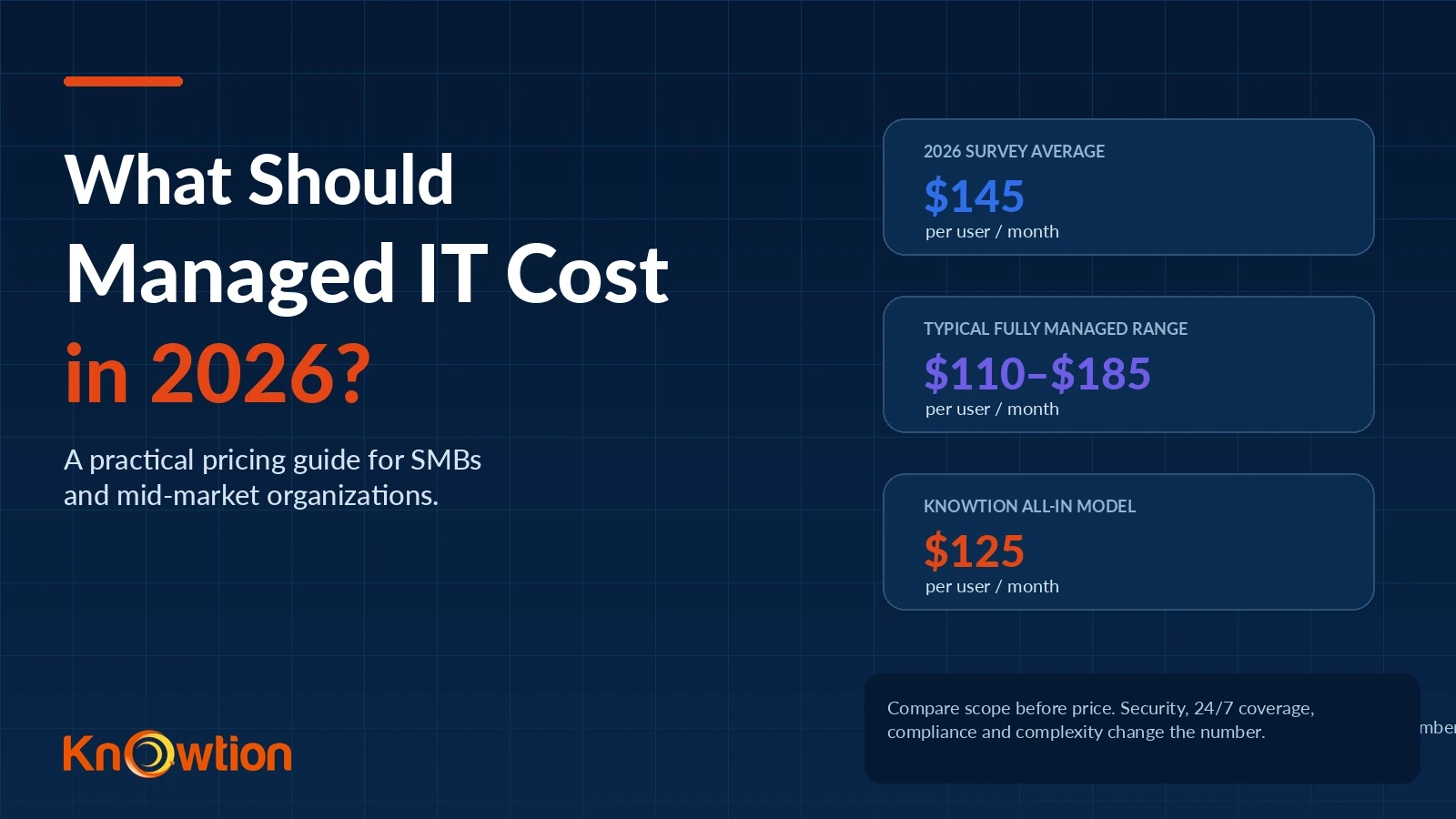
A June 2026 pricing survey of 412 MSPs and buyers across the United States and Canada reported an average of $145 per user per month for fully managed IT, with most plans falling between $110 and $185. The same study reported an $85 average for co-managed IT. Source: 2026 MSP Pricing Benchmark.
A separate 2026 dataset tracking pricing across 47 U.S. metropolitan markets found that most businesses pay roughly $100–$200 per user per month, with a national midpoint near $142. Source: CloudSecureTech 2026 pricing data. The point is not that every MSP should cost the same. It is that credible 2026 benchmarks now give buyers a way to identify quotes that are unusually low or high and ask why.
Knowtion publishes its own price instead of forcing a sales call just to get a directional number. The Knowtion IT Cost Calculator currently models all-in support at $125 per user per month. That sits inside the reported 2026 market range and below the $145 survey average. Final pricing can still move based on environment complexity, compliance requirements, locations and agreed scope.
HOW THE NUMBER IS BUILT
The four pricing models buyers are most likely to encounter
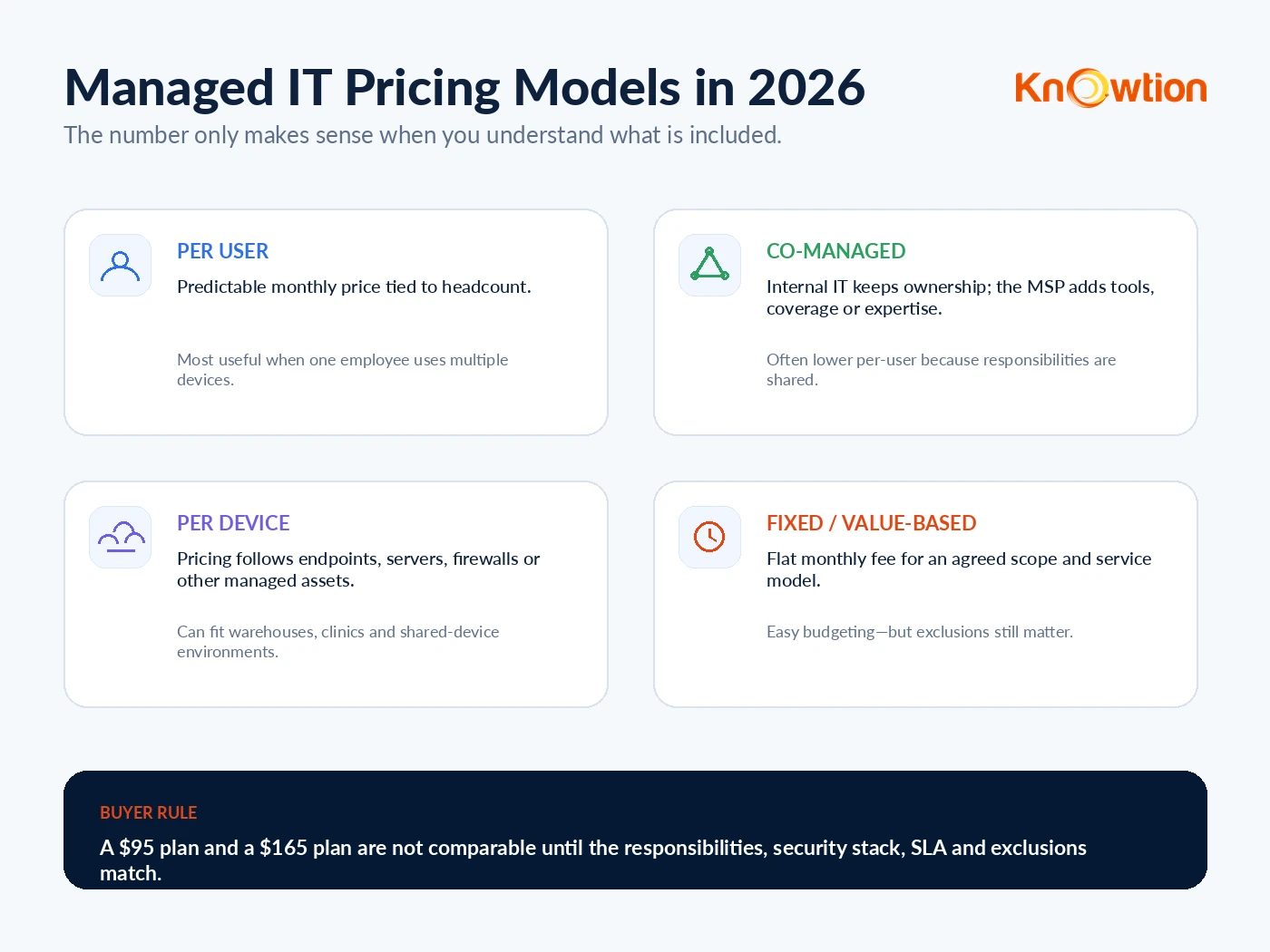
There is no single correct pricing model. Kaseya’s MSP benchmark research has long shown the market using a mix of per-user, per-device, blended, tiered and value-based models, while its 2025 benchmark found co-managed IT continuing to expand as internal teams look for additional coverage and specialist capacity. Source: Kaseya 2025 Global MSP Benchmark highlights.
| Model | How it works | Best fit |
|---|---|---|
| Per user | One monthly price for each supported employee and the technology assigned to them. | Most SMB and mid-market knowledge-work environments. |
| Co-managed | The internal IT team keeps selected responsibilities while the MSP adds help desk, monitoring, security, projects or after-hours capacity. | Organizations with internal IT that needs leverage rather than replacement. |
| Per device | Pricing follows endpoints, servers, firewalls or other managed assets. | Shared-device environments such as clinics, manufacturing floors and warehouses. |
| Fixed / value-based | A flat monthly fee covers an agreed scope and service model. | Businesses prioritizing predictable budgeting and clear ownership. |
COMPARE RESPONSIBILITIES, NOT LABELS
What should fully managed IT include?
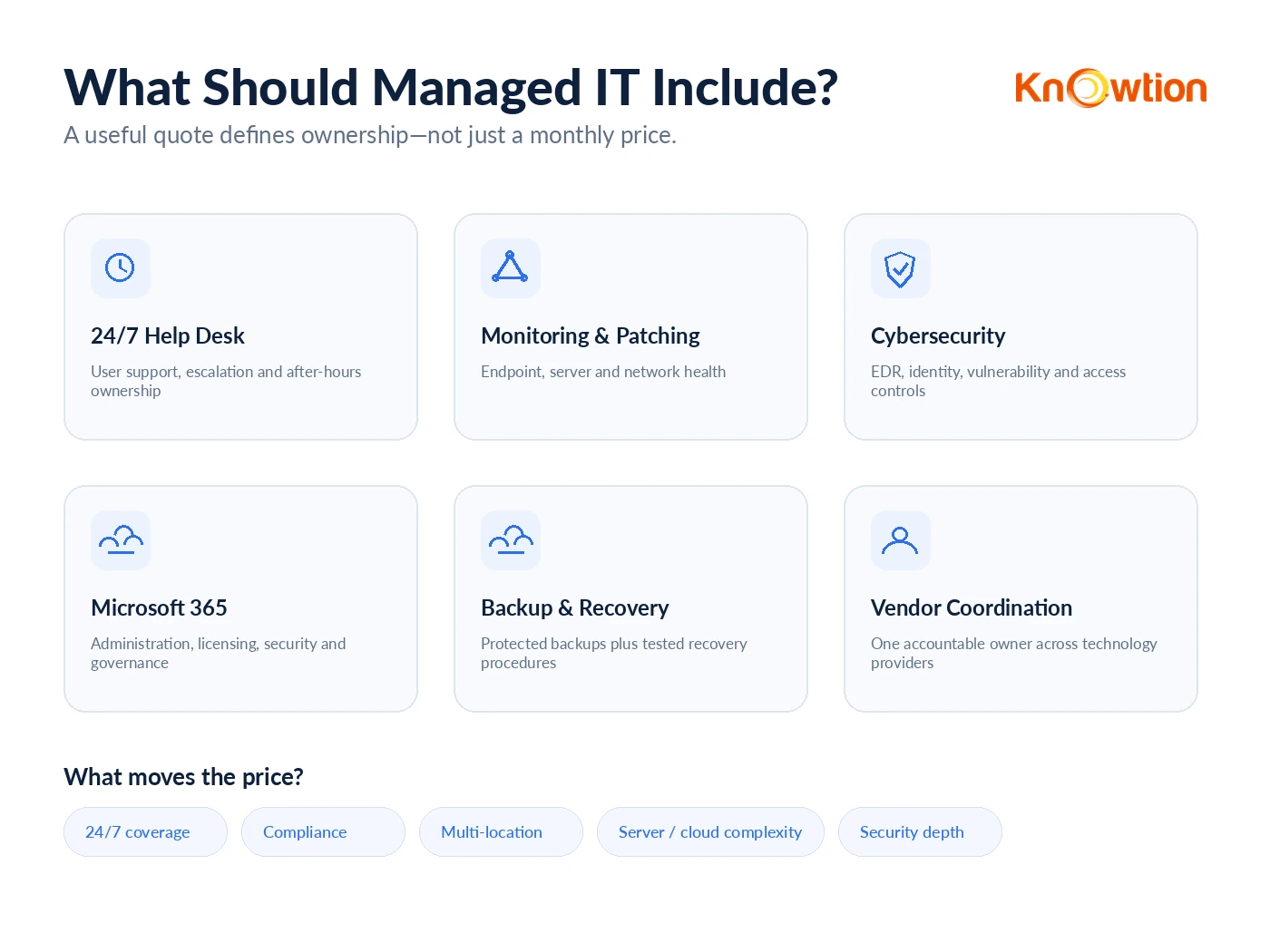
At a mid-market price point, “managed IT” should mean more than a help desk and remote monitoring agent. The exact stack differs by provider, but the agreement should clearly define ownership across the operating environment.
User support
Help desk, escalation, onboarding/offboarding and an after-hours model appropriate to the business.
Monitoring & maintenance
Endpoint, server and network monitoring, patching, health visibility and proactive remediation.
Cybersecurity
Endpoint protection, identity controls, vulnerability management, access governance and security guidance.
Microsoft 365
Administration, licensing, tenant security, user lifecycle management and device policy where included.
Backup & recovery
Protected backups, recovery planning and evidence that recovery procedures actually work.
Vendor coordination
Accountability when the issue crosses internet, phone, ERP, SaaS or other technology providers.
Microsoft 365 is a good example of why scope matters. Microsoft currently lists Business Premium at $22 per user per month on an annual subscription, with policy-based identity/access controls, advanced device management and threat protection included in the license. Source: Microsoft. An MSP proposal may include managing those capabilities, include the license itself, or treat licensing as a separate pass-through charge. Those are three different proposals even if each says “Microsoft 365 management.”
WHY TWO COMPANIES PAY DIFFERENT RATES
Seven factors that move the managed IT price
- Support coverage: true 24/7 response costs more than business-hours support with best-effort after-hours escalation.
- Cybersecurity depth: EDR, MDR/SOC, vulnerability management, email protection, identity controls and security awareness can materially change the stack.
- Compliance: healthcare, legal, financial and government-adjacent environments often require more documentation, controls and evidence.
- Locations: a 50-user company in one office is operationally different from 50 users spread across 10 branches.
- Servers and cloud complexity: Azure, hybrid infrastructure, line-of-business servers and legacy applications increase management effort.
- Onsite requirements: organizations requiring frequent physical support generally cost more to serve than remote-first environments.
- Inherited technical debt: poor documentation, aging hardware, unsupported software and weak security controls can increase onboarding and stabilization work.
The cheapest quote often becomes expensive when these responsibilities reappear later as project fees, security add-ons, hourly support or internal staff time.
PUT THE NUMBERS IN CONTEXT
What $125 per user looks like at different company sizes
| Supported users | Knowtion model | Monthly estimate | Annual estimate |
|---|---|---|---|
| 25 | $125/user | $3,125 | $37,500 |
| 50 | $125/user | $6,250 | $75,000 |
| 75 | $125/user | $9,375 | $112,500 |
| 100+ | Custom scope | Let’s talk | Based on environment |
For organizations with 100+ users, Knowtion scopes pricing around locations, infrastructure, security, compliance and required service levels rather than forcing a one-size-fits-all seat price.
Those numbers are useful because they can be compared to other ways of staffing IT—but they are not apples-to-apples with one employee. The U.S. Bureau of Labor Statistics reports a $99,130 median annual wage for network and computer systems administrators in May 2025, before employer payroll taxes, benefits, recruiting, training or coverage for nights, vacations and specialized security expertise. Source: U.S. Bureau of Labor Statistics.
For a 50-user company, $125 per user equals $75,000 annually. That can be less than the salary alone for one median systems administrator while providing a broader team model. But the reverse can also be true: larger or highly specialized organizations may need internal IT plus an MSP. That is why co-managed IT for growing businesses can be more appropriate than replacing internal staff.
HOW TO BUY WELL
How to compare two MSP proposals without being fooled by the monthly number
Normalize the proposals before you compare them. Build a one-page responsibility matrix and ask each provider to mark what is included, excluded or separately billed.
| Question | What to clarify |
|---|---|
| Help desk | Hours, after-hours process, onsite support, limits and escalation. |
| Cybersecurity | Exact tools, MDR/SOC coverage, vulnerability management, email and identity protection. |
| Microsoft 365 | Administration vs. licensing; Intune, Entra, Defender and governance responsibilities. |
| Backup | What is protected, retention, immutable/offsite design and recovery testing. |
| Projects | What counts as normal maintenance versus separately billed project work. |
| Onboarding | One-time fees, cleanup assumptions, documentation and stabilization expectations. |
| Strategy | Roadmaps, budgeting, lifecycle planning, vendor management and executive reporting. |
| Termination | Notice periods, documentation ownership, credential transfer and transition support. |
If a provider is dramatically cheaper, ask what responsibility disappeared. If a provider is dramatically more expensive, ask what measurable risk or workload they are taking over. Price becomes useful only after scope is normalized.
If you are also questioning the quality of the relationship—not just the price—read When Should You Switch MSPs? 12 Signs Your IT Provider Is Holding You Back.
MAKE THE NUMBER REAL
Want to know what your IT should cost?
Tell us how many people you support and what your environment looks like. We’ll help you compare the number to the responsibilities you actually need.
MANAGED IT PRICING FAQ
Common questions about MSP pricing
How much do managed IT services cost per user in 2026?
A June 2026 survey of 412 MSPs and buyers reported a $145 average for fully managed IT and a typical range of $110 to $185 per user per month. Actual pricing varies with scope, security, locations, compliance and infrastructure complexity.
Is $125 per user per month expensive for managed IT?
It sits inside current 2026 benchmark ranges and below the $145 average reported in one 412-response pricing survey. The more important question is what the $125 includes. Knowtion uses an all-in model covering users, devices, networks, Microsoft 365 and cloud administration, cybersecurity, backups and vendor coordination within the agreed scope.
What should be included in a managed IT services agreement?
A complete agreement should clearly define help desk coverage, monitoring and patching, cybersecurity responsibilities, Microsoft 365 administration, backup and recovery, vendor coordination, strategic planning, onsite support and what work is considered a separately billed project.
Are Microsoft 365 licenses normally included in MSP pricing?
It depends on the provider. Some bundle Microsoft licensing, some resell it as a separate line item and others manage licenses purchased directly by the client. Knowtion offers Microsoft licensing at 10% below Microsoft MSRP and bills licensing separately from the managed IT estimate unless the client agreement states otherwise. Normalize this before comparing two MSP quotes.
Is co-managed IT cheaper than fully managed IT?
Often yes because the internal IT team keeps part of the workload. A 2026 survey reported an $85 average for co-managed IT versus $145 for fully managed IT, but actual scope varies widely.
Does managed IT replace an internal IT employee?
Sometimes, but not always. Smaller organizations may outsource most IT operations, while mid-sized businesses frequently use co-managed IT to augment internal staff with help desk coverage, cybersecurity, monitoring, projects or after-hours support.
Why do some MSPs charge onboarding fees?
Onboarding may include discovery, documentation, deployment of management and security tools, remediation of inherited issues, backup validation and account cleanup. Ask whether the fee covers a defined transition plan and what happens if the environment requires significant remediation.